# Projectile
[](https://github.com/bbatsov/projectile/actions?query=workflow%3ACI)
[](http://melpa.org/#/projectile)
[](http://stable.melpa.org/#/projectile)
[](https://elpa.nongnu.org/nongnu/projectile.html)
[![License GPL 3][badge-license]](http://www.gnu.org/licenses/gpl-3.0.txt)
[](https://discord.gg/3Cf2Qpyry5)
## Synopsis
**Projectile** is a project interaction library for Emacs.
It provides a powerful set of features operating at the project
level, as well as simple heuristics to identify projects.
Here are some of essential Projectile's features:
* jump to a file in project
* jump to a project buffer
* jump to a test in project
* toggle between files with same names but different extensions (e.g. `.h` <-> `.c/.cpp`, `Gemfile` <-> `Gemfile.lock`)
* toggle between code and its test (e.g. `main.service.js` <-> `main.service.spec.js`)
* jump to recently visited files in the project
* switch between projects you have worked on
* kill (close) all project buffers
* grep (search) in project
* replace in project
* find references in project (using `xref` internally)
* run shell commands in a project (e.g. `make`, `lein`)
* support for multiple minibuffer completion/selection libraries (`ido`, `ivy`, `helm`, and the default completion system)
* automatic project discovery (see `projectile-project-search-path`)
* integration with the built-in `project.el` library
There's also a rich ecosystem of third-party [Projectile extensions](https://melpa.org/#/?q=projectile) that add even more features.
---------------
[](https://www.patreon.com/bbatsov)
[](https://www.paypal.com/cgi-bin/webscr?cmd=_s-xclick&hosted_button_id=GRQKNBM6P8VRQ)
I've been developing Projectile for over a decade now (since 2011). While it's a fun
project to work on, it still requires a lot of time and energy to
maintain.
You can support my work on Projectile via
[PayPal](https://www.paypal.me/bbatsov),
[Patreon](https://www.patreon.com/bbatsov) and
[GitHub Sponsors](https://github.com/sponsors/bbatsov).
## Projectile in Action
Here's a glimpse of Projectile in action (using `ivy`):
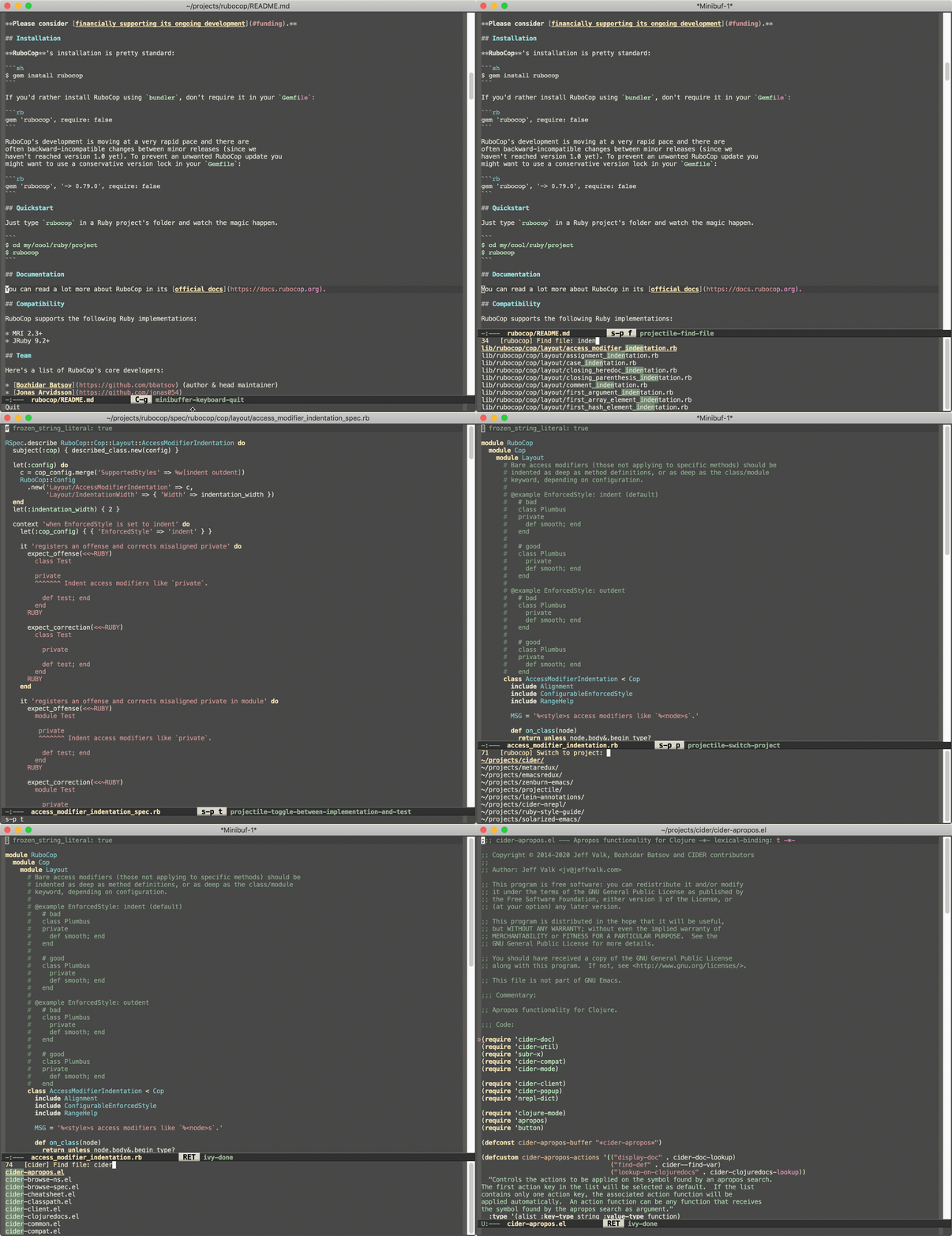
In this short demo you can see:
* finding files in a project
* switching between implementation and test
* switching between projects
## Quickstart
The instructions that follow are meant to get you from zero to a running Projectile setup
in a minute. Visit the
[online documentation](https://docs.projectile.mx) for (way) more
details.
### Installation
`package.el` is the built-in package manager in Emacs.
Projectile is available on all major `package.el` community
maintained repos - [NonGNU ELPA](https://elpa.nongnu.org),
[MELPA Stable](http://stable.melpa.org)
and [MELPA](http://melpa.org).
You can install Projectile with the following command:
M-x `package-install` [RET] `projectile` [RET]
Alternatively, users of Debian 9 or later or Ubuntu 16.04 or later may
simply `apt-get install elpa-projectile`.
Finally add this to your Emacs config:
```elisp
(projectile-mode +1)
;; Recommended keymap prefix on macOS
(define-key projectile-mode-map (kbd "s-p") 'projectile-command-map)
;; Recommended keymap prefix on Windows/Linux
(define-key projectile-mode-map (kbd "C-c p") 'projectile-command-map)
```
Those keymap prefixes are just a suggestion. Feel free to put there whatever works best for you.
### Basic Usage
Enable `projectile-mode`, open a file in one of your projects and type a command such as C-c p f.
See the [online documentation](https://docs.projectile.mx/projectile/usage.html) for more details.
To get the most of Projectile you also need to enable (and potentially install)
some minibuffer completion framework (e.g. `ido`, `ivy` or `vertico`). See
[this
section](https://docs.projectile.mx/projectile/configuration.html#completion-options)
of the documentation for more details.
> [!CAUTION]
>
> Historically `projectile-completion-system` defaulted to `ido`, but this was
> changed in version 2.3. You may need to enable `ido-mode` in your Emacs
> configuration if updating from an older version of Projectile.
## Design Goals
In this section you'll find some notes on Projectile's design goals, that
have been upheld since the earliest days of the project.
### Portability
Projectile provides a nice set of features operating on a project level without
introducing external dependencies (when feasible). For instance -
finding project files has a portable implementation written in pure
Emacs Lisp without the use of GNU `find` (but for performance's sake an
indexing mechanism backed by external commands exists as well).
### Simplicity
This library provides easy project management and navigation. The concept of a
project is pretty basic - just a folder containing some special file (e.g. a VCS
marker or a project descriptor file like `pom.xml` or `Gemfile`). Projectile
will auto-detect pretty much every popular project type out of the box
and you can easily extend it with additional project types.
### Easy to Use
The configuration defaults are pretty reasonable and most users
will probably never feel a strong need to change them.
All commands are easily discoverable and are unlikely to surprise you
with their behavior.
### Practicality
Projectile tries to be practical - portability is great, but if some
external tools could speed up some task substantially and the tools
are available, Projectile will leverage them.
### Flexibility
In the classic spirit of Emacs almost every aspect of Projectile's behavior is
configurable.
## Caveats
* Some operations like search (grep) depend (presently) on external
utilities such as `find` or `fd` (version 8.3.0+).
* for older `fd` version add `(setq projectile-generic-command "fd . -0 --type f --color=never")` to your init-file
* Commands depending on external utilities might misbehave on the `fish` shell.
* Using Projectile over TRAMP might be slow in certain cases.
* Some commands might misbehave on complex project setups (e.g. a git project with submodules).
* Projectile was mostly tested on Unix OS-es (e.g. GNU/Linux and macOS), so some functionality might not work well on Windows.
* In Git repositories, deleted files are still shown in `projectile-find-file`
until their deletions are staged, due to a limitation of `git ls-files`. If
you install [fd](https://github.com/sharkdp/fd) then it is automatically used
instead, and does not have this problem. (You can inhibit the use of `fd` by
setting `projectile-git-use-fd` to `nil`.)
## Known issues
Check out the project's
[issue list](https://github.com/bbatsov/projectile/issues?sort=created&direction=desc&state=open)
a list of unresolved issues. By the way - feel free to fix any of them
and send me a pull request. :-)
## Contributors
Here's a [list](https://github.com/bbatsov/projectile/contributors) of all the people who have contributed to the
development of Projectile (a.k.a. Projectile's Hall of Fame).
Joining this esteemed group of people is only a commit away!
## Changelog
A fairly extensive changelog is available [here](CHANGELOG.md).
[badge-license]: https://img.shields.io/badge/license-GPL_3-green.svg
## License
Copyright © 2011-2026 Bozhidar Batsov and
[contributors](https://github.com/bbatsov/projectile/contributors).
Distributed under the GNU General Public License, version 3