#+TITLE:mu
[[https://github.com/djcb/mu/blob/master/COPYING][https://img.shields.io/github/license/djcb/mu?logo=gnu&.svg]]
[[https://en.cppreference.com][https://img.shields.io/badge/Made%20with-C/CPP-1f425f?logo=c&.svg]]
[[https://img.shields.io/github/v/release/djcb/mu][https://img.shields.io/github/v/release/djcb/mu.svg]]
[[https://github.com/djcb/mu/graphs/contributors][https://img.shields.io/github/contributors/djcb/mu.svg]]
[[https://github.com/djcb/mu/issues][https://img.shields.io/github/issues/djcb/mu.svg]]
[[https://github.com/djcb/mu/issues?q=is%3Aissue+is%3Aopen+label%3Arfe][https://img.shields.io/github/issues/djcb/mu/rfe?color=008b8b.svg]]
[[https://github.com/djcb/mu/pull/new][https://img.shields.io/badge/PRs-welcome-brightgreen.svg]]\\
[[https://www.gnu.org/software/emacs/][https://img.shields.io/badge/Emacs-28.1-922793?logo=gnu-emacs&logoColor=b39ddb&.svg]]
[[https://www.djcbsoftware.nl/code/mu/mu4e/Installation.html#Dependencies-for-Debian_002fUbuntu][https://img.shields.io/badge/Platform-Linux-2e8b57?logo=linux&.svg]]
[[https://www.djcbsoftware.nl/code/mu/mu4e/Installation.html#Building-from-a-release-tarball-1][https://img.shields.io/badge/Platform-FreeBSD-8b3a3a?logo=freebsd&logoColor=c32136&.svg]]
[[https://formulae.brew.sh/formula/mu#default][https://img.shields.io/badge/Platform-macOS-101010?logo=apple&logoColor=ffffff&.svg]]
Welcome to ~mu~!
#+begin_html
 #+end_html
With the enormous amounts of e-mail many people gather and the importance of
e-mail message in our work-flows, it's essential to quickly deal with all that
mail - in particular, to instantly find that one important e-mail you need right
now, and quickly file away message for later use.
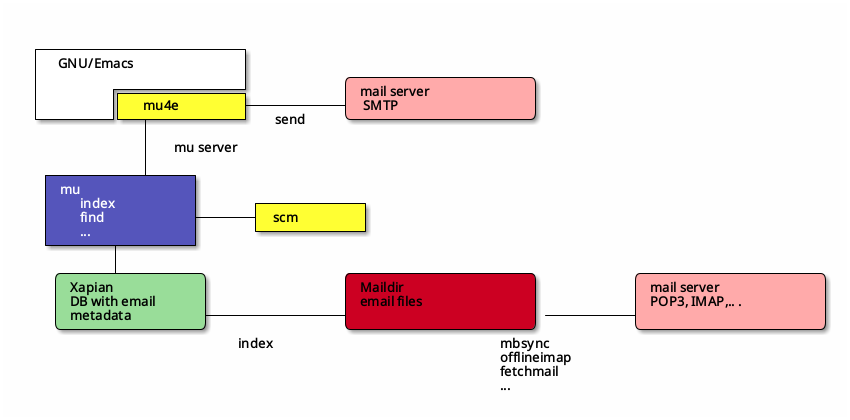
~mu~ is a set of command-line tools for dealing with e-mail messages stored in the
[[https://en.wikipedia.org/wiki/Maildir][Maildir]]-format. ~mu~'s goal is to help you to quickly find the messages you need,
view them, extract attachments, and so on.
On top of ~mu~, some related tools are built:
- ~mu4e~: a full-featured e-mail client that runs inside [[https://www.gnu.org/software/emacs/][GNU/Emacs]] (more below)
- ~mu-scm~: bindings for the [[https://www.gnu.org/software/guile/guile.html][Guile/Scheme]] programming language (version 3.0 and
later)
#+begin_html
#+end_html
With the enormous amounts of e-mail many people gather and the importance of
e-mail message in our work-flows, it's essential to quickly deal with all that
mail - in particular, to instantly find that one important e-mail you need right
now, and quickly file away message for later use.
~mu~ is a set of command-line tools for dealing with e-mail messages stored in the
[[https://en.wikipedia.org/wiki/Maildir][Maildir]]-format. ~mu~'s goal is to help you to quickly find the messages you need,
view them, extract attachments, and so on.
On top of ~mu~, some related tools are built:
- ~mu4e~: a full-featured e-mail client that runs inside [[https://www.gnu.org/software/emacs/][GNU/Emacs]] (more below)
- ~mu-scm~: bindings for the [[https://www.gnu.org/software/guile/guile.html][Guile/Scheme]] programming language (version 3.0 and
later)
#+begin_html
 #+end_html
After indexing your messages into a [[http://www.xapian.org][Xapian]]-database, you can search them through
a query language. You can use various message fields or words in the body text
to find the right messages.
~mu~ is written in C++; ~mu4e~ is written in ~elisp~ and ~mu-scm~ is written in a mix of
C++ and Scheme.
~mu~ is available in many Linux distributions (e.g. Debian/Ubuntu and Fedora)
under the name ~maildir-utils~; apparently because they don't like short names.
All of the code is distributed under the terms of the [[https://www.gnu.org/licenses/gpl-3.0.en.html][GNU General Public License
version 3]] (or higher).
The ~mu~ project welcomes contributions; see the Github issue list and [[IDEAS.org]].
Users and developers are encouraged to join the [[https://groups.google.com/g/mu-discuss/][mu-discuss]] mailing-list.
* Versions
*mu* attempts to balance development speed and stability.
Active development takes place on ~master~ (the 1.14 series), and we maintain the
~release/1.12~ branch as well, for any critical fixes.
Every few months, we release a stable version (e.g. ~1.14.0~); development then
continues in ~master~, with ~-pre~ (e.g. ~1.14.1-pre1~): ~-pre~-suffixed versions
refer to the current _development_ code, until it is released (and then looses its
~-pre~ suffix, i.e., becomes the ~1.14.1~ release).
Hence, generally we recommend the latest 1.14 release; if you want to avoid any
changes except critical bug-fixes, use the latest 1.12 [[https://github.com/djcb/mu/releases/][release]]; and finally, if
you want to track active development, use ~master~.
Overall, we try to avoid incompatible changes, but sometimes this is necessary,
for example to update the versions of required libraries.
* Installation
Note: building from source is an /advanced/ subject, especially if something goes
wrong. The below simple examples are a start, but all tools involved have many
options; there are differences between systems, versions etc. So if this is all
a bit daunting we recommend to wait for someone else to build it for you, such
as a Linux distribution. Many have packages available.
** Requirements
To be able to build ~mu~, ensure you have:
- a C++20 compiler (~gcc~ and ~clang~ are known to work)
- development packages for /Xapian/ and /GMime/ and /GLib/ (see ~meson.build~ for the
versions)
- basic tools such as ~make~, ~sed~, ~grep~
- ~meson~
For ~mu4e~, you also need ~emacs~, version 28 or later.
Note, support for Windows is very much _experimental_, that is, it works for some
people, but we can't really support it due to lack of the specific expertise.
Help is welcome!
** Building
#+begin_example
$ git clone https://github.com/djcb/mu.git
$ cd mu
#+end_example
~mu~ uses ~meson~ for building, so you can use that directly, and all the usual
commands apply. You can also use it _indirectly_ through the provided ~Makefile~,
which provides a number of useful targets.
For instance, using the ~Makefile~, you could install ~mu~ using:
#+begin_example
$ ./autogen.sh && make
$ sudo make install
#+end_example
You can of course also run ~meson~ directly (see the ~meson~ documentation for more
details):
#+begin_example
$ meson setup build
$ meson compile -C build
$ meson install -C build
#+end_example
* Initial setup
Most ~mu~ commands and ~mu4e~ require setting up the database, which is needed only
once. For this, there is the ~mu init~ command. See its manpage for all the
details, but could look something like:
#+begin_example
$ mu init --maildir=~/Maildir \
--personal-address=jim@example.com \
--personal-address=bob@example.com \
--ignored-address='.*reply*.'
#+end_example
This creates your database, specifies some of your personal addresses, and some
addresses (a regular expression) that should be ignored from the contacts-cache
used for address-autocompletion in ~mu4e~.
After this step, we can index our maildir:
#+begin_example
$ mu index
#+end_example
The first time you do this, it can take a few minutes, depending on how many
messages you have. Afterwards, you can run ~mu index~ e.g., after retrieving
messages from a remote server.
After that has completed you can try to find some messages with some simple
queries:
#+begin_example
$ mu find hello
#+end_example
* Mu4e
Mu4e is an e-mail client for [[https://www.gnu.org/software/emacs/][GNU/Emacs]] that works on top of ~mu~.
~mu4e~ is shipped as part of the ~mu~ package, and the versions must match.
Since there are so many different ways people use e-mail, there are a lot of
ways to customize it to your needs; see the [[https://www.djcbsoftware.nl/code/mu/mu4e/][Mu4e Reference Manual]] for all the
details, here we include quick-start instructions, in the form of ~use-package~
declaration.
Much of it is commented-out, pick the parts that best fit your particular needs;
see the manual for a deeper dive.
#+begin_src elisp
(use-package mu4e
:ensure nil
:config
;;;; Basics
;; (setq mu4e-mu-binary "/path/to/mu") ; only needed if mu is not in PATH
(setq mail-user-agent 'mu4e) ;; mu4e as the default emacs mail program
;; Identify yourself. Not strictly necessary.
;; (setq
;; user-mail-address "mickey@example.com"
;; user-full-name "Mickey Mouse")
;;
;;;; Retrieving mail
;;
;; Here, put the command you use for getting mail from some
;; remote server to your local Maildir. You can leave it at its
;; default when you have local delivery (rare these days)
;;
;; The command depends on your local setup, e.g.:
;; "offlineimap", "mbsync", "fetchmail", ... or some shell script
(setq mu4e-get-mail-command "/bin/true" ;;
mu4e-update-interval 180) ;; check every 3 minutes
;;
;;;; Reading mail
;;
;; You need to tell mu4e where it can find certain mail folders
;; in your Maildir; these are the paths relative to your maildir-root.
;; (setq
;; mu4e-inbox-folder "/inbox"
;; mu4e-sent-folder "/sent"
;; mu4e-drafts-folder "/drafts"
;; mu4e-trash-folder "/trash")
;;
;; For Gmail, these could look something like:
;; (setq
;; mu4e-inbox-folder "/INBOX"
;; mu4e-sent-folder "/[Gmail]/Sent Mail"
;; mu4e-drafts-folder "/drafts"
;; mu4e-trash-folder "/trash")
;; ;; (here we keep /drafts & /trash local)
;; define some shortcuts to maildirs you use often
;; the :key defines the shortcut key, the other parameters
;; determine what is (not) shown in the main-view. See the
;; `mu4e-maildir-shortcuts' docstring.
;; (setq mu4e-maildir-shortcuts
;; '((:maildir "/inbox" :key ?i :hide-if-no-unread t :favorite t)
;; (:maildir "/lists" :key ?l :hide-if-no-unread t)
;; (:maildir "/sent" :key ?s :hide-unread t))))
;; Defaults to homedir. Can also be a function, for file-specific
;; dirs; see docstring.
;; (setq mu4e-attachment-dir "~/Downloads")
;;
;;;; Sending mail
;;
;; Mail sending goes through the Emacs smtpmail package
;; the exact settings depend on your SMTP provider
(setq
send-mail-function smtpmail-send-it
message-send-mail-function smtpmail-send-it
;; smtpmail-smtp-user "user@example.com"
;; smtpmail-smtp-server "smtp.example.com"
;; smtpmail-smtp-service 465
;; smtpmail-stream-type 'tls
)
;;
;;;; Extras
;;
;; There are *many* more settings to customize mu4e. Here are a few common
;; ones; just some examples, tweak to your preferences.
;; prefer text when mails have both text and html
;; (with-eval-after-load "mm-decode"
;; (add-to-list 'mm-discouraged-alternatives "text/html")
;; (add-to-list 'mm-discouraged-alternatives "text/richtext")
;; (add-to-list 'mm-discouraged-alternatives "multipart/related"))
;; Some visual tweaks
(setq mu4e-use-fancy-chars t) ;; allow for unicode emojis
;;
;;;; Custom bookmarks / queries
;; e.g.:
;; (add-to-list 'mu4e-bookmarks
;; '( :name "Inbox messages in the last 7 days"
;; :query (lambda ()
;; (format "maildir:/inbox AND date:%s"
;; (format-time-string
;; "%Y%m%d.."
;; (subtract-time (current-time)
;; (days-to-time 7)))))
;; :key ?w))
;; Tweak headers display; i.e. what headers to show, sizes etc.
;; Eg:
;; (setq
;; mu4e-headers-date-format "%Y-%m-%d"
;; mu4e-headers-time-format "%H:%M"
;; mu4e-headers-fields
;; '((:human-date . 10)
;; (:flags . 4)
;; (:from-or-to . 20)
;; (:mailing-list . 8)
;; (:maildir . 8)
;; (:labels . 8)
;; (:thread-subject . nil)))
;; Refiling a messages ('r'), i.e., move messages to some other folder,
;; based on their properties. mu4e-refile-folder can be a folder-name
;; or a function taking a message and returning a folder-name
;; (setq mu4e-refile-folder
;; (lambda (msg)
;; (cond
;; ;; all messages sent by me go to the sent folder
;; ((mu4e-message-sent-by-me msg) (mu4e-get-sent-folder msg))
;; ;; all mu-related messages go to the mu folder
;; ((mu4e-message-contact-field-matches msg :to
;; "mu-discuss@googlegroups.com")
;; "/mu")
;; ;; some work-related senders
;; ((seq-some
;; (lambda (addr) (mu4e-message-contact-field-matches msg :from addr))
;; `(,(rx "boss@company.com" eos)
;; ,(rx "lucy@bookkeeper.com" eos)
;; ,(rx "jim@taxes.gov" eos)))
;; "/work")
;; ;; everything else goes to /archive
;; (t
;; "/archive"))))
;; Tweak the message-view
;; (setq
;; mu4e-view-date-format "%Y-%m-%d %H:%M"
;; mu4e-view-fields
;; '(:from :to :cc :bcc :subject :flags :date :maildir :mailing-list))
;; with nerd-icons or all-the-icons installed, you can get some icons when
;; view messaages, e.g.
;; (setq mu4e-file-name-to-icon-function #'nerd-icons-icon-for-file)
;; or
;; (setq mu4e-file-name-to-icon-function #'all-the-icons-icon-for-file)
;; Set a message signature:
;; (setq message-signature
;; (concat
;; "User McUserFace\n"
;; "http://www.example.com\n"))
:hook
;; tweak the composer
((mu4e-compose-mode . (lambda ()
(set-fill-column 72)
(flyspell-mode)))
;; allow for inserting attachments with dired,
;; with `M-x gnus-dired-attach'
(dired-mode . turn-on-gnus-dired-mode))
:bind ;; the Mu4e transient menu
(("C-c m" . mu4e-transient-menu)))
#+end_src
#+end_html
After indexing your messages into a [[http://www.xapian.org][Xapian]]-database, you can search them through
a query language. You can use various message fields or words in the body text
to find the right messages.
~mu~ is written in C++; ~mu4e~ is written in ~elisp~ and ~mu-scm~ is written in a mix of
C++ and Scheme.
~mu~ is available in many Linux distributions (e.g. Debian/Ubuntu and Fedora)
under the name ~maildir-utils~; apparently because they don't like short names.
All of the code is distributed under the terms of the [[https://www.gnu.org/licenses/gpl-3.0.en.html][GNU General Public License
version 3]] (or higher).
The ~mu~ project welcomes contributions; see the Github issue list and [[IDEAS.org]].
Users and developers are encouraged to join the [[https://groups.google.com/g/mu-discuss/][mu-discuss]] mailing-list.
* Versions
*mu* attempts to balance development speed and stability.
Active development takes place on ~master~ (the 1.14 series), and we maintain the
~release/1.12~ branch as well, for any critical fixes.
Every few months, we release a stable version (e.g. ~1.14.0~); development then
continues in ~master~, with ~-pre~ (e.g. ~1.14.1-pre1~): ~-pre~-suffixed versions
refer to the current _development_ code, until it is released (and then looses its
~-pre~ suffix, i.e., becomes the ~1.14.1~ release).
Hence, generally we recommend the latest 1.14 release; if you want to avoid any
changes except critical bug-fixes, use the latest 1.12 [[https://github.com/djcb/mu/releases/][release]]; and finally, if
you want to track active development, use ~master~.
Overall, we try to avoid incompatible changes, but sometimes this is necessary,
for example to update the versions of required libraries.
* Installation
Note: building from source is an /advanced/ subject, especially if something goes
wrong. The below simple examples are a start, but all tools involved have many
options; there are differences between systems, versions etc. So if this is all
a bit daunting we recommend to wait for someone else to build it for you, such
as a Linux distribution. Many have packages available.
** Requirements
To be able to build ~mu~, ensure you have:
- a C++20 compiler (~gcc~ and ~clang~ are known to work)
- development packages for /Xapian/ and /GMime/ and /GLib/ (see ~meson.build~ for the
versions)
- basic tools such as ~make~, ~sed~, ~grep~
- ~meson~
For ~mu4e~, you also need ~emacs~, version 28 or later.
Note, support for Windows is very much _experimental_, that is, it works for some
people, but we can't really support it due to lack of the specific expertise.
Help is welcome!
** Building
#+begin_example
$ git clone https://github.com/djcb/mu.git
$ cd mu
#+end_example
~mu~ uses ~meson~ for building, so you can use that directly, and all the usual
commands apply. You can also use it _indirectly_ through the provided ~Makefile~,
which provides a number of useful targets.
For instance, using the ~Makefile~, you could install ~mu~ using:
#+begin_example
$ ./autogen.sh && make
$ sudo make install
#+end_example
You can of course also run ~meson~ directly (see the ~meson~ documentation for more
details):
#+begin_example
$ meson setup build
$ meson compile -C build
$ meson install -C build
#+end_example
* Initial setup
Most ~mu~ commands and ~mu4e~ require setting up the database, which is needed only
once. For this, there is the ~mu init~ command. See its manpage for all the
details, but could look something like:
#+begin_example
$ mu init --maildir=~/Maildir \
--personal-address=jim@example.com \
--personal-address=bob@example.com \
--ignored-address='.*reply*.'
#+end_example
This creates your database, specifies some of your personal addresses, and some
addresses (a regular expression) that should be ignored from the contacts-cache
used for address-autocompletion in ~mu4e~.
After this step, we can index our maildir:
#+begin_example
$ mu index
#+end_example
The first time you do this, it can take a few minutes, depending on how many
messages you have. Afterwards, you can run ~mu index~ e.g., after retrieving
messages from a remote server.
After that has completed you can try to find some messages with some simple
queries:
#+begin_example
$ mu find hello
#+end_example
* Mu4e
Mu4e is an e-mail client for [[https://www.gnu.org/software/emacs/][GNU/Emacs]] that works on top of ~mu~.
~mu4e~ is shipped as part of the ~mu~ package, and the versions must match.
Since there are so many different ways people use e-mail, there are a lot of
ways to customize it to your needs; see the [[https://www.djcbsoftware.nl/code/mu/mu4e/][Mu4e Reference Manual]] for all the
details, here we include quick-start instructions, in the form of ~use-package~
declaration.
Much of it is commented-out, pick the parts that best fit your particular needs;
see the manual for a deeper dive.
#+begin_src elisp
(use-package mu4e
:ensure nil
:config
;;;; Basics
;; (setq mu4e-mu-binary "/path/to/mu") ; only needed if mu is not in PATH
(setq mail-user-agent 'mu4e) ;; mu4e as the default emacs mail program
;; Identify yourself. Not strictly necessary.
;; (setq
;; user-mail-address "mickey@example.com"
;; user-full-name "Mickey Mouse")
;;
;;;; Retrieving mail
;;
;; Here, put the command you use for getting mail from some
;; remote server to your local Maildir. You can leave it at its
;; default when you have local delivery (rare these days)
;;
;; The command depends on your local setup, e.g.:
;; "offlineimap", "mbsync", "fetchmail", ... or some shell script
(setq mu4e-get-mail-command "/bin/true" ;;
mu4e-update-interval 180) ;; check every 3 minutes
;;
;;;; Reading mail
;;
;; You need to tell mu4e where it can find certain mail folders
;; in your Maildir; these are the paths relative to your maildir-root.
;; (setq
;; mu4e-inbox-folder "/inbox"
;; mu4e-sent-folder "/sent"
;; mu4e-drafts-folder "/drafts"
;; mu4e-trash-folder "/trash")
;;
;; For Gmail, these could look something like:
;; (setq
;; mu4e-inbox-folder "/INBOX"
;; mu4e-sent-folder "/[Gmail]/Sent Mail"
;; mu4e-drafts-folder "/drafts"
;; mu4e-trash-folder "/trash")
;; ;; (here we keep /drafts & /trash local)
;; define some shortcuts to maildirs you use often
;; the :key defines the shortcut key, the other parameters
;; determine what is (not) shown in the main-view. See the
;; `mu4e-maildir-shortcuts' docstring.
;; (setq mu4e-maildir-shortcuts
;; '((:maildir "/inbox" :key ?i :hide-if-no-unread t :favorite t)
;; (:maildir "/lists" :key ?l :hide-if-no-unread t)
;; (:maildir "/sent" :key ?s :hide-unread t))))
;; Defaults to homedir. Can also be a function, for file-specific
;; dirs; see docstring.
;; (setq mu4e-attachment-dir "~/Downloads")
;;
;;;; Sending mail
;;
;; Mail sending goes through the Emacs smtpmail package
;; the exact settings depend on your SMTP provider
(setq
send-mail-function smtpmail-send-it
message-send-mail-function smtpmail-send-it
;; smtpmail-smtp-user "user@example.com"
;; smtpmail-smtp-server "smtp.example.com"
;; smtpmail-smtp-service 465
;; smtpmail-stream-type 'tls
)
;;
;;;; Extras
;;
;; There are *many* more settings to customize mu4e. Here are a few common
;; ones; just some examples, tweak to your preferences.
;; prefer text when mails have both text and html
;; (with-eval-after-load "mm-decode"
;; (add-to-list 'mm-discouraged-alternatives "text/html")
;; (add-to-list 'mm-discouraged-alternatives "text/richtext")
;; (add-to-list 'mm-discouraged-alternatives "multipart/related"))
;; Some visual tweaks
(setq mu4e-use-fancy-chars t) ;; allow for unicode emojis
;;
;;;; Custom bookmarks / queries
;; e.g.:
;; (add-to-list 'mu4e-bookmarks
;; '( :name "Inbox messages in the last 7 days"
;; :query (lambda ()
;; (format "maildir:/inbox AND date:%s"
;; (format-time-string
;; "%Y%m%d.."
;; (subtract-time (current-time)
;; (days-to-time 7)))))
;; :key ?w))
;; Tweak headers display; i.e. what headers to show, sizes etc.
;; Eg:
;; (setq
;; mu4e-headers-date-format "%Y-%m-%d"
;; mu4e-headers-time-format "%H:%M"
;; mu4e-headers-fields
;; '((:human-date . 10)
;; (:flags . 4)
;; (:from-or-to . 20)
;; (:mailing-list . 8)
;; (:maildir . 8)
;; (:labels . 8)
;; (:thread-subject . nil)))
;; Refiling a messages ('r'), i.e., move messages to some other folder,
;; based on their properties. mu4e-refile-folder can be a folder-name
;; or a function taking a message and returning a folder-name
;; (setq mu4e-refile-folder
;; (lambda (msg)
;; (cond
;; ;; all messages sent by me go to the sent folder
;; ((mu4e-message-sent-by-me msg) (mu4e-get-sent-folder msg))
;; ;; all mu-related messages go to the mu folder
;; ((mu4e-message-contact-field-matches msg :to
;; "mu-discuss@googlegroups.com")
;; "/mu")
;; ;; some work-related senders
;; ((seq-some
;; (lambda (addr) (mu4e-message-contact-field-matches msg :from addr))
;; `(,(rx "boss@company.com" eos)
;; ,(rx "lucy@bookkeeper.com" eos)
;; ,(rx "jim@taxes.gov" eos)))
;; "/work")
;; ;; everything else goes to /archive
;; (t
;; "/archive"))))
;; Tweak the message-view
;; (setq
;; mu4e-view-date-format "%Y-%m-%d %H:%M"
;; mu4e-view-fields
;; '(:from :to :cc :bcc :subject :flags :date :maildir :mailing-list))
;; with nerd-icons or all-the-icons installed, you can get some icons when
;; view messaages, e.g.
;; (setq mu4e-file-name-to-icon-function #'nerd-icons-icon-for-file)
;; or
;; (setq mu4e-file-name-to-icon-function #'all-the-icons-icon-for-file)
;; Set a message signature:
;; (setq message-signature
;; (concat
;; "User McUserFace\n"
;; "http://www.example.com\n"))
:hook
;; tweak the composer
((mu4e-compose-mode . (lambda ()
(set-fill-column 72)
(flyspell-mode)))
;; allow for inserting attachments with dired,
;; with `M-x gnus-dired-attach'
(dired-mode . turn-on-gnus-dired-mode))
:bind ;; the Mu4e transient menu
(("C-c m" . mu4e-transient-menu)))
#+end_src